

Run a Node
Install, synchronize, monitor, and maintain Conceal Core without exposing private RPC.
Run a Conceal node on a host where you control storage, network access, backups, and updates. This guide covers Core 6.7.5 and Guardian 0.7.8. Check both release pages before installation.
Choose and verify a Core package
Core 6.7.5 provides these platform archives on its official release page:
| Platform | Release asset |
|---|---|
| macOS | ccx-cli-macOS-v6.7.5.zip |
| Ubuntu 22.04 | ccx-cli-ubuntu-2204-v6.7.5.tar.gz |
| Ubuntu 24.04 | ccx-cli-ubuntu-2404-v6.7.5.tar.gz |
| Windows 64-bit | ccx-cli-win64-v6.7.5.zip |
Download only from the official release. Verify any checksum or signature the release publishes before executing the archive. If the release provides no integrity value you can independently validate, record that gap and assess the risk. Never run a binary received through chat, email, a mirror, or an unverified download link.
Keep a copy of your configuration and a tested wallet backup outside the node's data directory. A blockchain copy is replaceable; wallet recovery material is not.
First start and synchronization
- Read the Core documentation for the release and platform you selected.
- Run the daemon as a dedicated, unprivileged operating-system account. Keep its data and logs out of publicly served directories.
- Start with the default network unless you intentionally need another network. Record the binary version and configuration path.
- Allow the daemon to discover peers and synchronize. Watch the local height, peer count, disk space, and logs.
- Compare the local height with the live explorer. Small differences can occur while a block propagates; a persistent or growing gap needs investigation.
- Restart the host or service once under controlled conditions and confirm that the daemon returns, reconnects, and resumes synchronization.
Do not use a node for wallet or application traffic until it reports a healthy status and remains close to the network height.
RPC and host boundaries
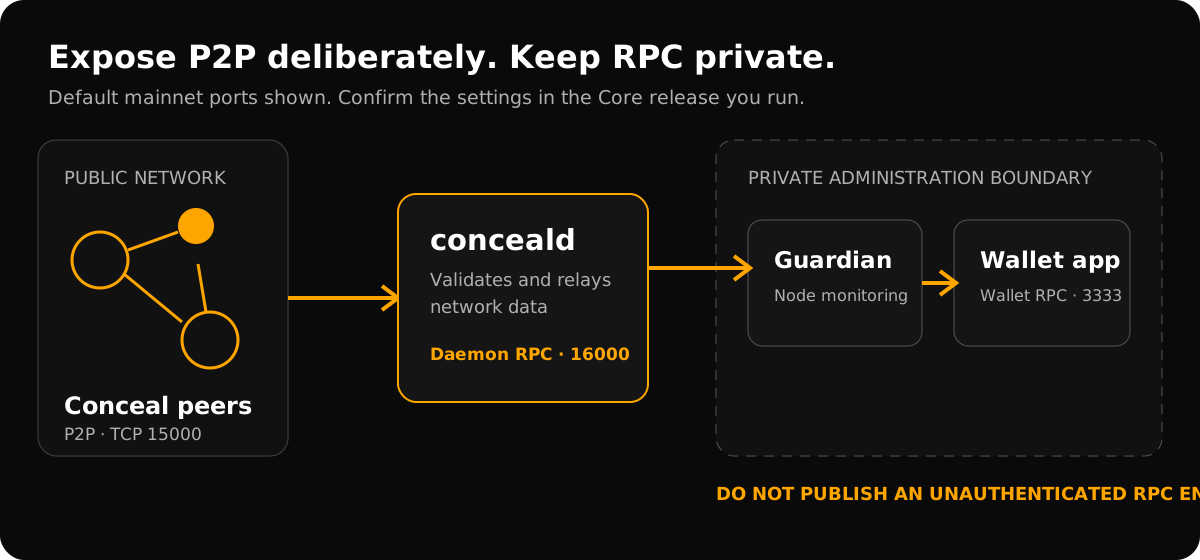
Treat daemon and wallet RPC as private administration interfaces. Never publish an unauthenticated RPC endpoint. If a remote application needs access, add authentication, network filtering, encryption, rate limits, logs, and a way to revoke access. Check the Core documentation for your installed version before enabling a method.
| Interface | Default port | Normal boundary |
|---|---|---|
| Mainnet P2P | TCP 15000 | Public only when the operator intends to accept peers |
| Daemon RPC | TCP 16000 | Local host or private administration network |
| Wallet RPC | TCP 3333 when configured that way | Private application boundary with authentication and filtering |
Ports can be changed by configuration. These are Core defaults, not instructions to open every port. Exposing P2P does not require exposing RPC.
Routine operations
Use a small, repeatable checklist instead of waiting for a wallet failure:
| Frequency | Check | Investigate when |
|---|---|---|
| Continuous | Service state and restart loop | The daemon exits, repeatedly restarts, or stops advancing |
| Continuous | Local height against a trusted network reference | The gap persists or grows |
| Daily | Peer count, warnings, and recent error logs | Peers remain absent or one error repeats |
| Daily | Free disk space and filesystem health | Growth leaves too little headroom for sync and logs |
| After change | Version, bind addresses, firewall, and RPC reachability | A private interface becomes reachable from an unintended network |
| Scheduled | Restore procedure and configuration backup | The backup cannot be read or the recovery steps are incomplete |
Before an upgrade, read the release notes, capture the current version and height, back up configuration, and confirm there is enough free space. Stop cleanly, change one component at a time, then verify version, peer recovery, height progress, logs, and private RPC boundaries. Keep the prior package available for a planned rollback, but do not roll back across incompatible data changes without release-specific guidance.
Guardian monitoring
Conceal Guardian monitors conceald, checks block progress, can restart the daemon, and can send Discord or email notifications. This guide covers Guardian 0.7.8.
Treat Guardian as a separate privileged service:
- Run it with only the permissions needed to inspect and restart the daemon.
- Store webhook and SMTP credentials outside source control, and restrict access to the configuration file.
- Begin with notifications enabled but automated restart disabled or carefully observed, then test a planned failure.
- Alert on repeated restart attempts so a bad configuration, damaged disk, or incompatible binary does not become an endless loop.
- Enable pool-listing or remote-node features only when you intend to operate those public services and understand their exposure.
Monitoring flags conditions to investigate. It does not prove node correctness, availability, wallet safety, or a network service level.
Incident checklist
If the daemon falls behind or becomes unavailable:
- Preserve the current logs, version, configuration, height, and disk state before restarting.
- Check host time, storage, memory pressure, peer connectivity, and recent changes.
- Confirm whether the explorer and other independent nodes are advancing.
- Restart once through the normal service manager, then observe whether height and peers recover.
- If the fault repeats, stop the restart loop and diagnose the first error. Do not delete the data directory or restore wallet files as a generic fix.
- When asking for help, remove credentials, private addresses, wallet paths, and recovery material from logs and screenshots.